Deploying Apache Kafka® on Kubernetes: A Complete Guide
Apache Kafka® is a powerful, distributed streaming engine designed for high-throughput, fault-tolerant data streaming. It enables real-time data processing across a variety of applications, making it a critical component for modern data architectures. Kafka is widely adopted for log aggregation, event-driven microservices, real-time analytics, and more.
While Kafka is a robust solution, deploying and managing it at scale can be challenging, particularly in cloud-native environments. This is where Kubernetes (K8s) comes in. Kubernetes offers a powerful orchestration layer for managing Kafka clusters, providing features like automated scaling, self-healing, and seamless deployment. Despite the added complexity of deploying Kafka on Kubernetes, the benefits of portability, scalability, and cloud-agnostic infrastructure make it an appealing choice for developers and platform engineers.
Even if you plan to use managed Kafka services like Amazon MSK, Confluent Cloud, or Azure Event Hubs, understanding how Kafka runs on Kubernetes is valuable. Many organizations operate hybrid environments, integrating managed and self-managed Kafka deployments across on-premises, private cloud, and public cloud environments. Knowing how to deploy and manage Kafka on Kubernetes ensures flexibility in handling these hybrid setups, improving reliability and performance.
What You Will Learn About Kafka on Kubernetes
In this guide, we will cover:
-
The architecture of Kafka on Kubernetes
-
Key challenges and considerations
-
Best practices for deploying and managing Kafka on Kubernetes
-
How to optimize performance and ensure reliability
By the end of this article, you'll have a solid understanding of how to run Kafka on Kubernetes effectively, whether for self-managed deployments or in conjunction with hosted or managed Kafka services.
Benefits of Running Kafka on Kubernetes
To effectively deploy Kafka on Kubernetes, it's crucial to understand both Kafka's architecture and Kubernetes' container orchestration capabilities. Kafka consists of multiple brokers that manage message storage and processing, coordinated by ZooKeeper. Kubernetes, with its powerful orchestration features, helps manage these components efficiently, ensuring high availability and resilience.
-
Scalability: Kubernetes makes it easier to scale Kafka clusters dynamically based on workload demands. It improves scalability by leveraging Kubernetes's inherent ability to dynamically add or remove nodes, allowing you to easily scale your Kafka cluster horizontally by adding more brokers (Kafka servers) to handle increased data throughput as needed, all while maintaining high availability through features like replication and partitioning within Kafka itself.
-
Resilience: Kubernetes provides self-healing capabilities, automatically rescheduling failed brokers, combined with Kafka's inherent fault-tolerant design, including message replication across multiple brokers, ensuring data is not lost even if a node fails, thus providing high availability for streaming data pipelines.
-
Automated Management: Kubernetes Operators simplify Kafka deployment and maintenance by providing a unified platform to automate deployment, scaling, and lifecycle management of Kafka clusters, allowing teams to focus less on infrastructure maintenance and more on application development, thanks to Kubernetes' inherent scalability and abstraction capabilities, leading to streamlined operations and reduced operational overhead.
-
Cloud-Native Efficiency: Running Kafka on Kubernetes ensures better integration with cloud-native tools by enabling seamless scaling, automated deployment and management of Kafka clusters, leveraging Kubernetes' inherent scalability to handle large volumes of real-time data streams while providing a unified platform for managing diverse cloud environments, making it ideal for building distributed, event-driven applications in a cloud-native architecture.
Managing Kafka Clusters on Kubernetes With StatefulSets vs. Deployments
Kafka requires a Kubernetes StatefulSet because it is a stateful application that needs stable network identities and persistent storage for its brokers, which StatefulSets provide by guaranteeing unique identifiers for each pod, allowing for reliable communication and data persistence even when pods are restarted or rescheduled within the cluster; essentially, it ensures that each Kafka broker maintains a consistent identity and can access its data reliably across pod lifecycle changes.
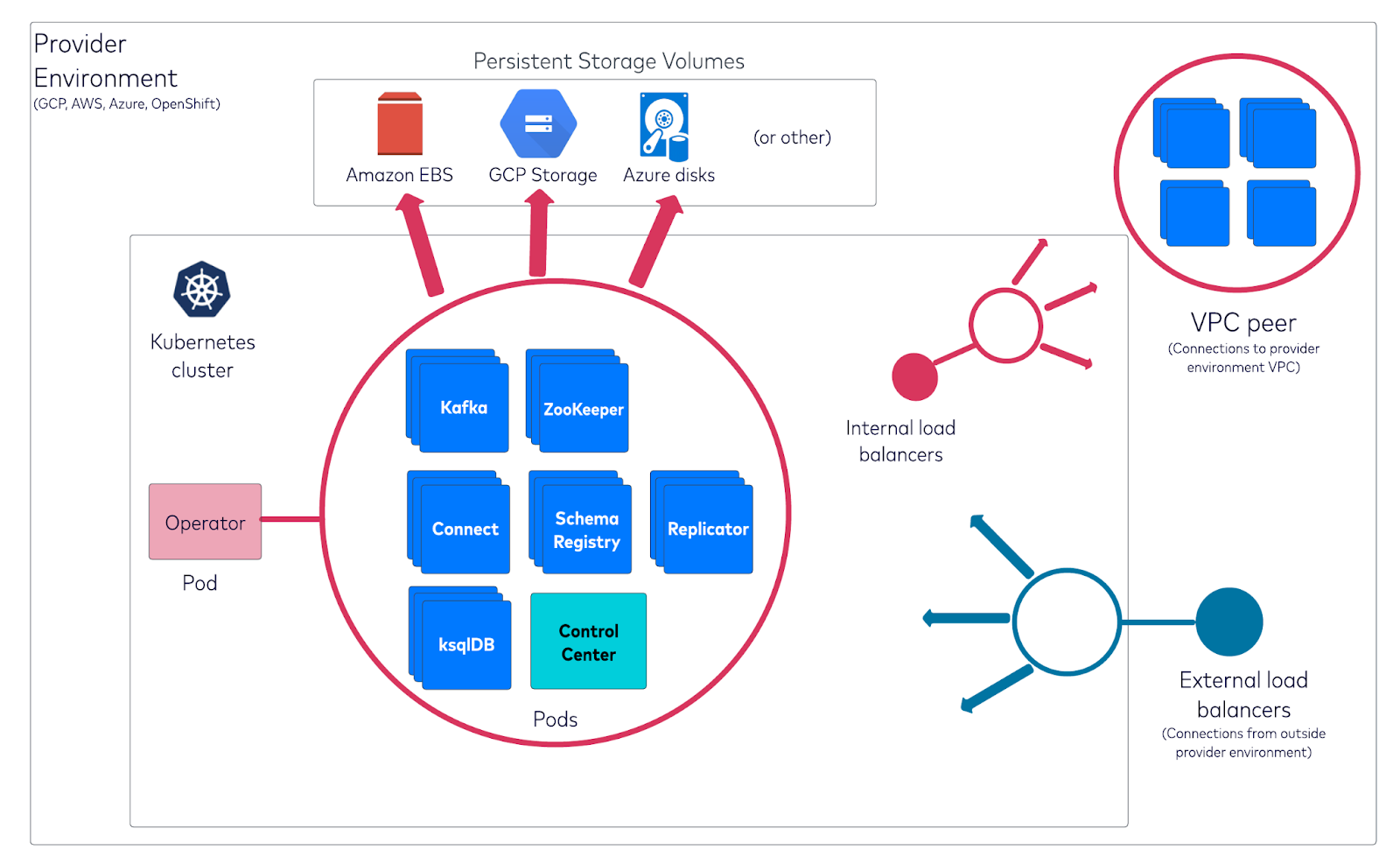
How Kafka is installed on Kubernetes clusters and orchestrated within a VPC environment
When deploying Kafka on Kubernetes, a "Deployment" is used for stateless applications where pods are interchangeable, while a "StatefulSet" is preferred for Kafka brokers as it guarantees unique identities and persistent storage for each pod, making it ideal for managing stateful applications like Kafka where each broker needs a stable network identity and data persistence; essentially, a StatefulSet ensures that each Kafka broker maintains its identity even after restarts, unlike a standard Deployment which would treat pods as replaceable.
If you deploy Kafka on Kubernetes using a regular Deployment instead of a StatefulSet, your Kafka brokers will lose their state upon restarts or pod reschedules because Deployments are designed for stateless applications, meaning any data stored within the pod will be lost when the pod is replaced, making it unsuitable for managing a stateful system like Kafka which requires persistent storage to maintain data consistency across broker restarts; essentially, you would not have a reliable Kafka cluster as data could be lost during pod re-scheduling or failures.
Visit Confluent for Kubernetes Quick Start
Prerequisites for Deploying Kafka on Kubernetes
Before deploying Kafka on Kubernetes, ensure you have the following:
-
A running Kubernetes cluster
-
kubectl installed and configured
-
Helm (a package manager for Kubernetes)
-
Sufficient storage and compute resources for Kafka brokers
Understanding the Kafka Operator and Helm Charts
Kubernetes Operator and Helm Charts are two primary methods for deploying Kafka on Kubernetes.
-
Kafka Operator: Automates Kafka deployment, scaling, and management using Kubernetes-native APIs.
-
Helm Charts: Simplify Kafka installation using predefined configurations and templates.
Step 1: Create the namespace to use
kubectl create namespace confluent
Step 2: Set this namespace to default for your Kubernetes context
kubectl config set-context --current --namespace confluent
Step 3: Set up helm chart
helm repo add confluentinc https://packages.confluent.io/helm
Step 4: Install confluent for kubernetes using helm
helm upgrade --install confluent-operator confluentinc/confluent-for-kubernetes --namespace confluent
Step 5: Check that Confluent for Kubernetes pod is up and running
kubectl get pods
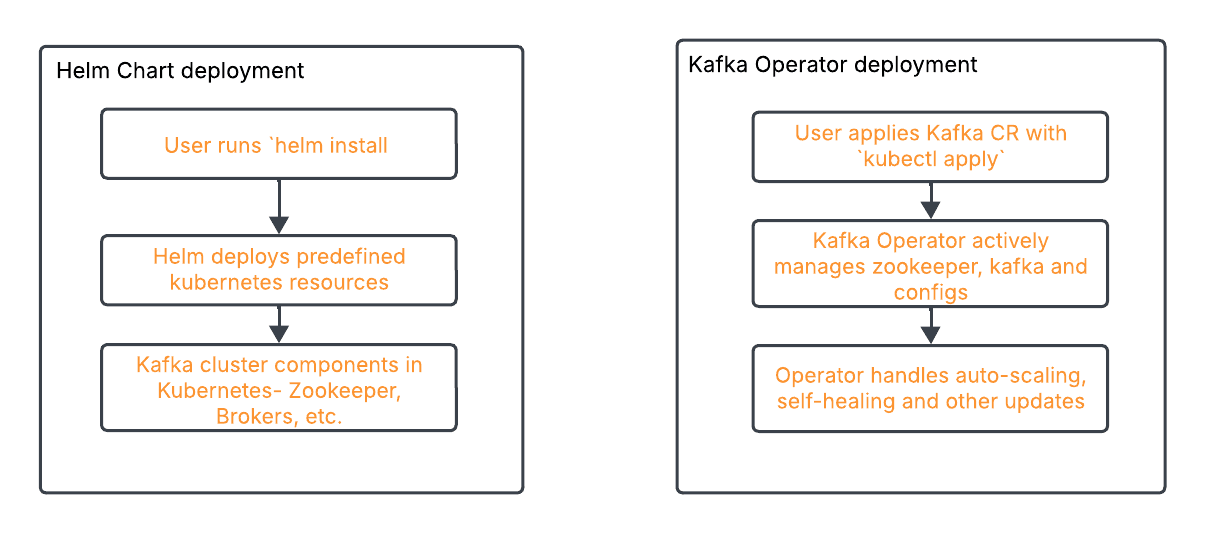
How Helm Chart deployment process compares to Kafka Operator deployment process
Steps for Running Kafka on Kubernetes
This section will guide you through the process of deploying Kafka on Kubernetes, from setting up the environment to configuring Kafka topics and validating the deployment.
Setting Up the Environment
Prerequisites:
Before proceeding, ensure you have the following installed:
-
Kubernetes Cluster (Minikube, EKS, GKE, AKS, etc.)
-
kubectl (Kubernetes CLI)
-
Helm (Package Manager for Kubernetes)
-
Strimzi Operator
Installing Helm
Helm simplifies application deployment on Kubernetes by managing Kubernetes YAML templates.
Step 1: Install Helm
Run the following command:
curl https://raw.githubusercontent.com/helm/helm/main/scripts/get-helm-3 | bash
To verify installation:
helm version
Installing Strimzi using Helm
Strimzi provides Helm charts for deploying Kafka on Kubernetes.
Step 2: Add Strimzi Helm Repository
helm repo add strimzi https://strimzi.io/charts/
helm repo update
Step 3: Install Strimzi Using Helm
helm install strimzi strimzi/strimzi-kafka-operator -n kafka --create-namespace
To check if the operator is running:
kubectl get pods -n kafka
Strimzi Operator YAML Configuration
apiVersion: kafka.strimzi.io/v1beta2
kind: Kafka
metadata:
  name: my-cluster
  namespace: kafka
spec:
  kafka:
    version: 3.4.0
    replicas: 3
    listeners:
      - name: plain
        port: 9092
        type: internal
        tls: false
    storage:
      type: persistent-claim
      size: 10Gi
      deleteClaim: false
  zookeeper:
    replicas: 3
    storage:
      type: persistent-claim
      size: 5Gi
  entityOperator:
    topicOperator: {}
    userOperator: {}
Key Configurations Explained:
-
Kafka Cluster (spec.kafka): Defines the number of Kafka broker replicas and their version.
-
Storage (storage.type: persistent-claim): Ensures data persistence.
-
Zookeeper (spec.zookeeper): Manages Kafka broker metadata.
-
Entity Operator: Enables Topic and User operators for automation.
Deploying Kafka Using Strimzi Operator
Apply the Kafka cluster configuration:
kubectl apply -f kafka-cluster.yaml -n kafka
To verify Kafka is running:
kubectl get pods -n kafka
Configuring Kafka Topics and Deploying Kafka Connect
Define a topic in a YAML file (kafka-topic.yaml):
apiVersion: kafka.strimzi.io/v1beta2
kind: KafkaTopic
metadata:
  name: my-topic
  labels:
    strimzi.io/cluster: my-cluster
spec:
  partitions: 3
  replicas: 3
Testing the Kafka Deployment
-
Verify the health of Kafka and Zookeeper:
kubectl get pods -n kafka
kubectl logs -n kafka my-cluster-kafka-0
-
Check Kafka Connect status:
kubectl get kafkaconnect -n kafka
Producing and Consuming Messages
kubectl run kafka-producer -n kafka --image=strimzi/kafka:latest --stdin --tty -- /bin/sh
Inside the container, produce a message:
kafka-console-producer.sh --broker-list my-cluster-kafka-bootstrap:9092 --topic my-topic
kubectl run kafka-consumer -n kafka --image=strimzi/kafka:latest --stdin --tty -- /bin/sh
Inside the container, consume messages:
kafka-console-consumer.sh --bootstrap-server my-cluster-kafka-bootstrap:9092 --topic my-topic --from-beginning
You should see the messages from the producer.
Cleaning Up
To delete the Kafka cluster:
kubectl delete -f kafka-cluster.yaml -n kafka
kubectl delete namespace kafka
Key Challenges and Best Practices for Deploying Kafka on Kubernetes
Running Kafka on Kubernetes introduces several operational challenges. In this section, we will discuss common issues and best practices to optimize performance, maintain stability, and ensure smooth scaling.
Benefits of Confluent vs. Running Open Source Kafka on Kubernetes
Since Kubernetes dynamically schedules workloads, it is crucial to track Kafka clusters closely to understand resource consumption, message throughput, and potential failures. You need to have robust strategies, technologies, and processes in place for:
-
Resource Management: Properly allocating CPU, memory, and storage resources to Kafka brokers to prevent bottlenecks.
-
Monitoring and Logging: Utilizing Prometheus, Grafana, and ELK stack to track Kafka metrics and logs effectively.
-
Scaling Clusters: Configuring Kubernetes autoscaling for Kafka brokers and partitions to handle varying workloads.
-
Networking and Connectivity: Ensuring optimal network configurations for high-throughput and low-latency messaging.
-
Security and Access Control: Implementing authentication, authorization, and encryption for secure communication.
With Confluent, you have a complete data streaming platform that simplifies how you optimize resource utilization, monitor Kafka performance, scale clusters, and secure your streaming workloads—no matter where your data lives.
For On-Prem or Private Cloud: Confluent for Kubernetes simplifies deploying and managing Confluent Platform within Kubernetes, enabling a declarative API experience.
For Cloud Workloads: Confluent Cloud abstracts away complex management while maintaining cloud-native performance and seamless integration with Confluent Platform.
Monitoring and Addressing Performance Issues With Kafka on Kubernetes
Effective monitoring helps in diagnosing performance issues, ensuring system reliability, and scaling Kafka clusters efficiently.
Several key metrics should be monitored to maintain an optimal Kafka deployment. Broker health and availability are fundamental, requiring close observation of the number of active brokers, CPU and memory usage, and under-replicated partitions. Additionally, topic and partition metrics, such as the rate of messages being produced and consumed, the number of partitions per topic, and replication lag, provide insights into Kafka's workload and data distribution. Consumer group monitoring is equally critical, as consumer lag—the gap between produced and consumed messages—can indicate slow consumers or insufficient resources.
Storage and disk utilization must also be tracked to avoid Kafka performance bottlenecks. Monitoring Kafka log segment sizes, disk utilization per broker, and log retention policies ensures efficient resource management. Moreover, network performance plays a crucial role in Kafka’s reliability, with key metrics like network throughput per broker, request latency, and failed request rates helping diagnose connectivity and performance issues.
To effectively monitor Kafka in Kubernetes, various tools can be used. Prometheus and Grafana are widely adopted solutions, with Prometheus collecting real-time Kafka metrics via the JMX Exporter and Grafana providing a visual representation through dashboards. The ELK stack (Elasticsearch, Logstash, and Kibana) is another powerful toolset, enabling centralized logging and anomaly detection in Kafka logs. Strimzi, a popular Kafka operator for Kubernetes, offers built-in monitoring capabilities that simplify tracking Kafka performance. Additionally, Confluent Control Center provides an enterprise-grade monitoring solution with deep insights into Kafka operations.
In practical scenarios, monitoring helps identify and resolve performance issues efficiently. For example, an increasing consumer lag may indicate slow consumers or inadequate resources, necessitating adjustments to resource allocation or scaling.
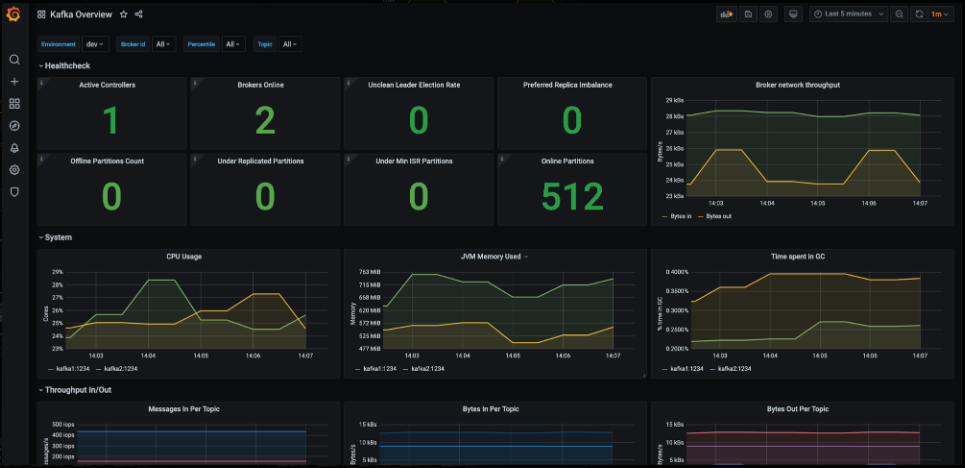
The screenshot shown above serves as an example of a Grafana dashboard that, when properly configured, provides comprehensive insights into various aspects of a Kafka deployment. It displays detailed information about brokers, clusters, message throughput, partitions, and offset metrics, enabling users to monitor and analyze Kafka's performance effectively.
Scaling Kafka Nodes in Kubernetes
Kafka scaling can be categorized into horizontal scaling and vertical scaling. Horizontal scaling involves adding more Kafka brokers to distribute the workload, reducing stress on existing brokers. Kubernetes allows dynamic scaling using StatefulSets, ensuring that new brokers are assigned unique identities and persistent storage.
Horizontal scaling is beneficial when message throughput increases or when consumer lag indicates an overloaded system. Vertical scaling, on the other hand, involves increasing the CPU, memory, or disk resources allocated to existing brokers. This approach is useful when brokers experience high resource consumption but adding more brokers isn’t feasible due to partitioning constraints.
Kubernetes autoscaling mechanisms can be used to scale Kafka efficiently. The Horizontal Pod Autoscaler (HPA) can automatically adjust the number of Kafka broker pods based on CPU or memory usage thresholds. However, since Kafka brokers require stable identities, HPA is often used in combination with manual scaling or custom controllers.
The Cluster Autoscaler is another Kubernetes tool that adjusts the number of worker nodes to accommodate growing resource demands. Additionally, Strimzi, a popular Kafka operator for Kubernetes, simplifies Kafka cluster scaling by providing declarative configurations to add or remove brokers dynamically.
To effectively scale Kafka, several factors need to be considered.
-
Partition reassignment is essential when adding new brokers, as existing partitions must be redistributed to balance load effectively.
-
Apache Kafka provides tools like the kafka-reassign-partitions.sh script to facilitate partition migration.
-
Replication factors should also be adjusted to maintain fault tolerance, ensuring data remains available even if brokers fail.
-
Furthermore, storage and network constraints must be evaluated before scaling, as adding more brokers without sufficient disk capacity or bandwidth can lead to bottlenecks.
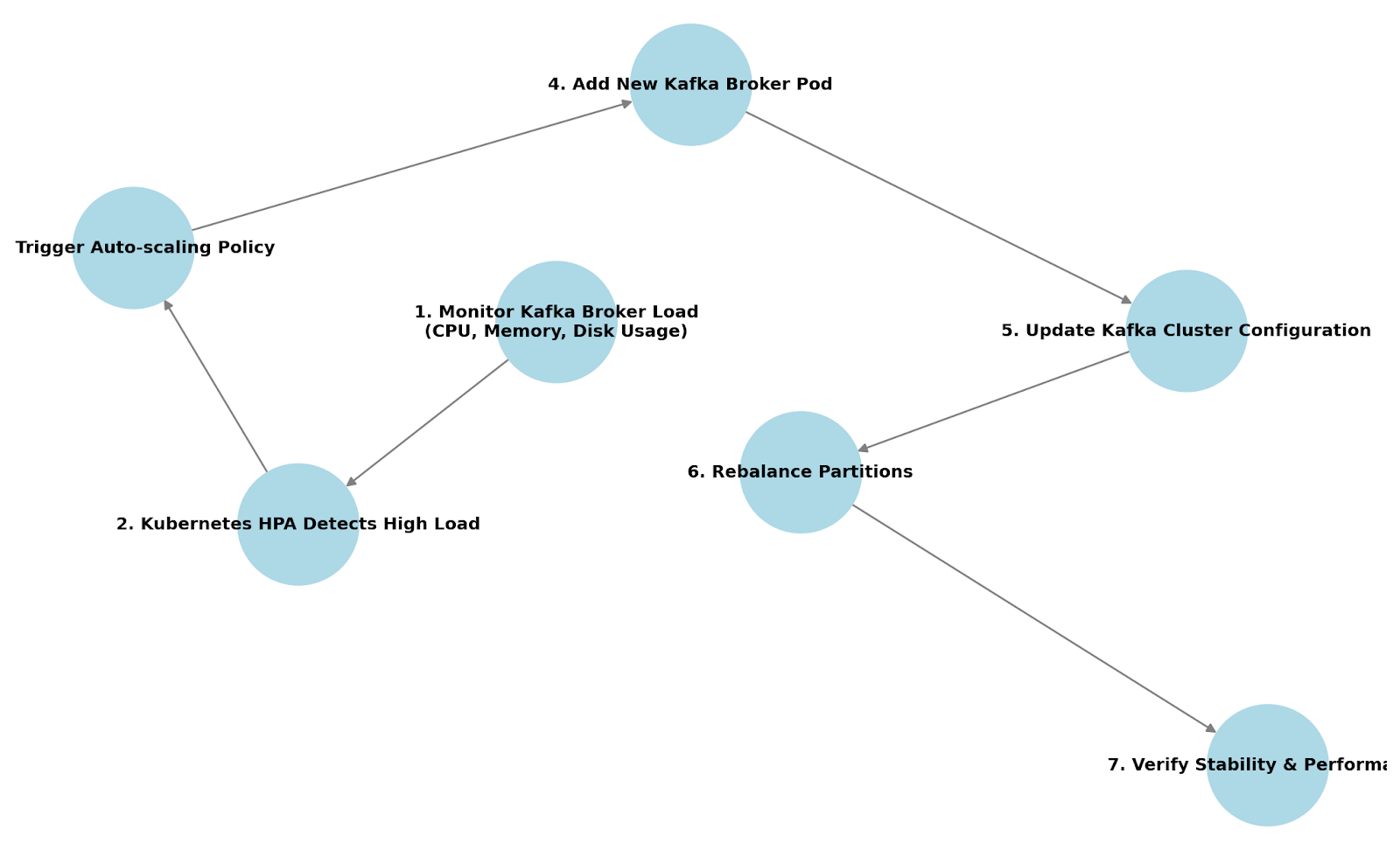
How horizontally scaling Kafka works when deployed on Kubernetes
In a real-world scenario, an organization might need to scale Kafka during peak traffic periods, such as Black Friday sales or high-volume data streaming events. By integrating Kubernetes scaling strategies with Kafka partition management, businesses can handle fluctuating workloads seamlessly. Automating scaling with Kubernetes and Kafka tools ensures that the system remains resilient, maintains low latency, and continues processing data efficiently without manual intervention.
For more in-depth recommendations, check out these resources:
Troubleshooting Kafka on Kubernetes
Despite careful deployment, issues can arise when running Kafka on Kubernetes. This section provides a troubleshooting guide for common problems.
Troubleshooting Flowcharts
Kafka Pod Not Starting?
-
Is the Kafka pod in Pending state?
Check if there are sufficient resources (CPU, memory) available in the cluster. If resources are insufficient, scale up worker nodes or adjust resource requests/limits.
-
Is the Kafka pod in CrashLoopBackOff state?
Check the pod logs using:
kubectl logs -f <kafka-pod-name> -n <namespace>
Look for configuration errors, authentication failures, or connectivity issues. Verify that the Kafka broker’s advertised listeners are correctly set.
-
Are there ZooKeeper connectivity issues?
Check if ZooKeeper pods are running using:
kubectl get pods -n <namespace> | grep zookeeper
If ZooKeeper is down, Kafka brokers cannot register, leading to pod failures. Restart ZooKeeper pods or ensure the StatefulSet is properly deployed.
-
Are there persistent volume (PV) or persistent volume claim (PVC) issues?
Check if Kafka storage is correctly bound using:
kubectl get pvc -n <namespace>
If the PVC is stuck in Pending, ensure there is a storage class available. If Kafka storage is misconfigured, update volume claims and restart pods.
-
Are there network or DNS resolution issues?
Run a test to check if Kafka brokers can communicate:
kubectl exec -it <kafka-pod-name> -- nslookup <zookeeper-service>
If name resolution fails, check the Kubernetes DNS service.
-
Are there resource limits causing pod eviction?
Check resource limits in Kafka deployment:
kubectl describe pod <kafka-pod-name> -n <namespace>
If the pod is evicted due to resource constraints, increase limits or provision more nodes.
Is the Kafka container image valid and properly pulled?
kubectl describe pod <kafka-pod-name> -n <namespace>
Ensure the image exists and has the correct repository credentials.
Persistent Storage Issues?
-
Are the Persistent Volume (PV) and Persistent Volume Claim (PVC) bound?
kubectl get pvc -n <namespace>
If PVC is stuck in Pending, check if a matching PV is available. If PV is missing, create one or ensure dynamic provisioning is enabled.
-
Does the Kafka pod log indicate volume mount failures?
kubectl describe pod <kafka-pod-name> -n <namespace>
Look for errors related to volume mounting. Verify that the storage class and volume configurations are correct.
-
Is the storage class correctly defined and available?
kubectl get storageclass
If no storage class exists, define one or use a provider-specific default.
-
Are there filesystem permission issues preventing Kafka from accessing storage?
kubectl exec -it <kafka-pod-name> -- ls -l /var/lib/kafka/data
Ensure that Kafka has the correct permissions to read/write to the volume.
Modify permissions if necessary using:
chmod -R 777 /var/lib/kafka/data
5. Is the disk space full?
df -h
If the disk is full, delete old logs, resize the volume, or set log retention policies.
6. Are there issues with dynamic provisioning?
Check the storage provisioner logs:
kubectl logs -f <provisioner-pod> -n kube-system
If the provisioner fails to create a volume, check cloud provider settings.
Next Steps
Still want to learn more about deploying and managing Kafka on Kubernetes? Check out these resources to:
-
Experiment with Confluent for Kubernetes.
-
Watch a demo of a hybrid Kafka architecture integrating Confluent Cloud and Confluent Platform on-prem.
-
Read a white paper on advanced Kubernetes management techniques for Kafka.
Or get started on Confluent Cloud to see cloud-native Kafka, elastic autoscaling clusters, and ops-free data streaming in action.