What Is an Apache Kafka® Bootstrap Server?
In Apache Kafka®, a bootstrap server is a broker (or a set of brokers) that serves as an initial contact point for clients connecting to a Kafka cluster. It provides metadata about the cluster, allowing clients to discover all brokers and establish direct connections with them.
In this guide, we’ll show you how Kafka bootstrap servers work, their role in client-broker communication, best practices for configuration, and troubleshooting common connection issues—within in-product examples for Confluent Cloud, a cloud-native, fully managed Kafka service that abstracts away complexity so you can focus on building with Kakfa instead of managing and operating it.
How the Apache Kafka® Bootstrap Server Works
The Kafka bootstrap server provides an entry point for producer or consumer client applications to connect to a Kafka cluster.
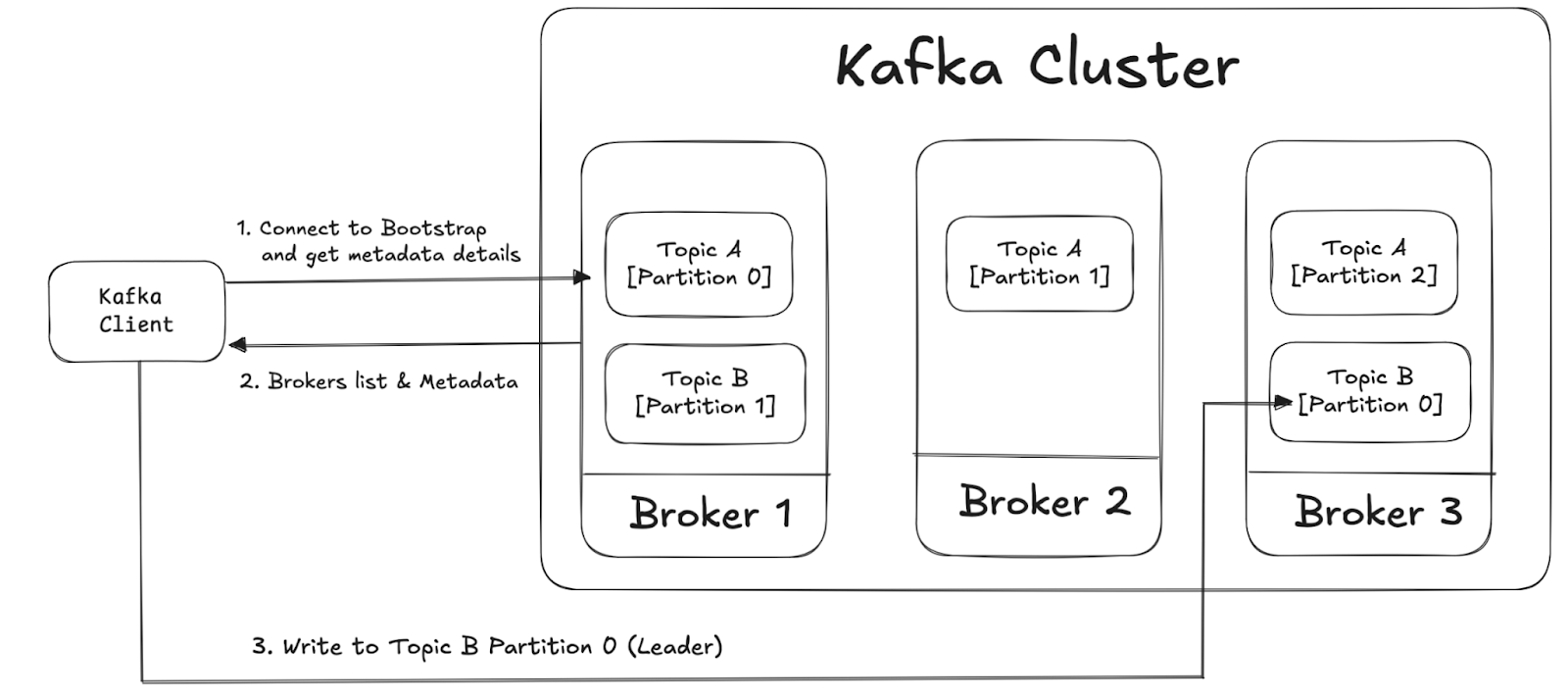
How the bootstrap server in a Kafka cluster allows Kafka clients to retrieve metadata details and start to read data from or write data to a Kafka topic
The process follows these three steps:
-
Initial Connection: The client is configured with a list of bootstrap servers. These bootstrap servers are a subset of brokers in the Kafka cluster. The client connects to one or more bootstrap servers from the configured list. If the first server is unavailable, it tries the next one in the list. The client sends a metadata request to the connected broker. This request asks for information about the cluster, including available topics, partitions, and leader brokers.
-
Metadata Response: The bootstrap server responds with metadata about the cluster. This includes details of brokers, topic partitions, and leader replicas.
Connection to Relevant Brokers: Based on the metadata, the client establishes direct connections with the appropriate brokers (responsible for the topics and partitions) it needs to read or write. The client starts producing or consuming messages by interacting with the assigned brokers. The bootstrap server is no longer needed unless a new metadata request is required.
Why Knowing How to Fix Bootstrap Server Connection Issues Is Essential
The Kafka bootstrap server is a fundamental component for developers building real-time applications and scalable data pipelines. It serves as the entry point for Kafka clients (producers, consumers, connectors) to connect to a Kafka cluster and interact with topics. Understanding its function is key to designing efficient and fault-tolerant streaming architectures. Some of the key functions of the Kafka bootstrap server are listed below:
Controls Cluster Discovery
The bootstrap server provides Kafka clients with an initial list of brokers. When a client connects, it retrieves metadata about all available brokers, ensuring it can interact with the entire cluster dynamically. This prevents the need to manually configure each broker's address.
Simplifies Configuration
Instead of specifying all broker addresses, developers only need to provide one or a few bootstrap servers. Kafka clients then automatically discover and communicate with the right brokers for reading and writing data, reducing manual overhead and misconfiguration risks.
Helps Increase Fault Tolerance
Because the bootstrap server is not a single point of failure, if the initially contacted broker is unavailable, the client can still connect to another broker using the metadata provided. This built-in resilience ensures high availability and uninterrupted data flow in distributed environments.
Once you understand how the Kafka bootstrap server works, that means you’ve grasped how distributed systems handle connectivity, scalability, and fault tolerance. It equips you with the knowledge needed to develop and deploy resilient, scalable, and high-performance real-time applications.
How to Configure Your Kafka Cluster’s Bootstrap Server
Let’s take a look at how to configure bootstrap servers within the Confluent Cloud UI.
If you've already signed up, activated your account and launched your first cluster, skip to step 3.
- Log in to Confluent Cloud
- Go to the Confluent Cloud login page in your internet browser.
- Log in with you Confluent Cloud Credentials.
- Create a Kafka cluster on Confluent Cloud:
- Select an existing Environment or create a new one.
- Click the "Create Cluster" or "Add Cluster" button to create a Kafka cluster.
- Choose a Cluster Type, such as Basic or Standard based on your requirement.
- Select a Cloud Provider (AWS, Azure or GCP) and a Region.
- Click "Continue" and confirm your cluster details.
- Click "Launch Cluster" (cluster creation may take a few minutes)
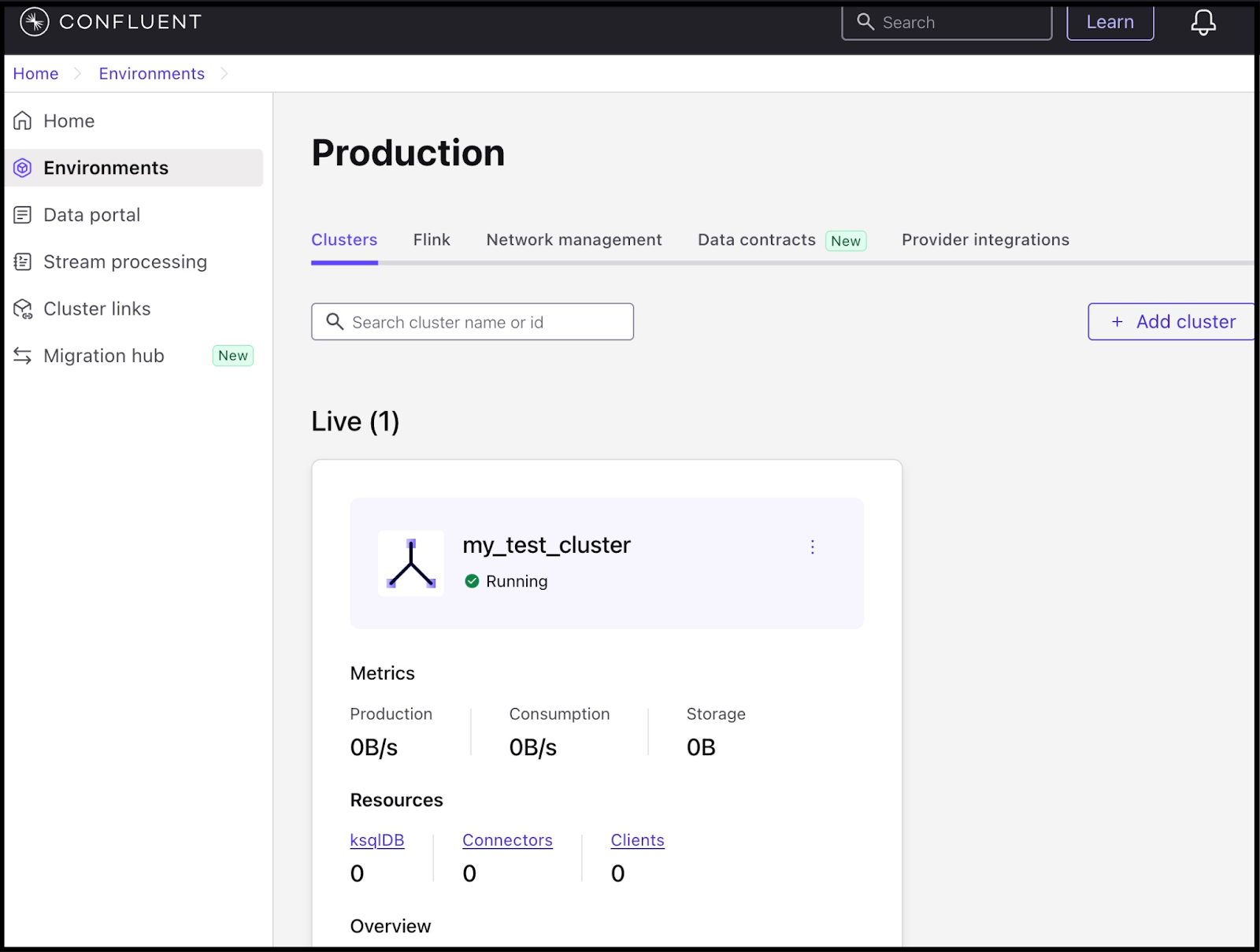
- Explore the Kafka bootstrap server:
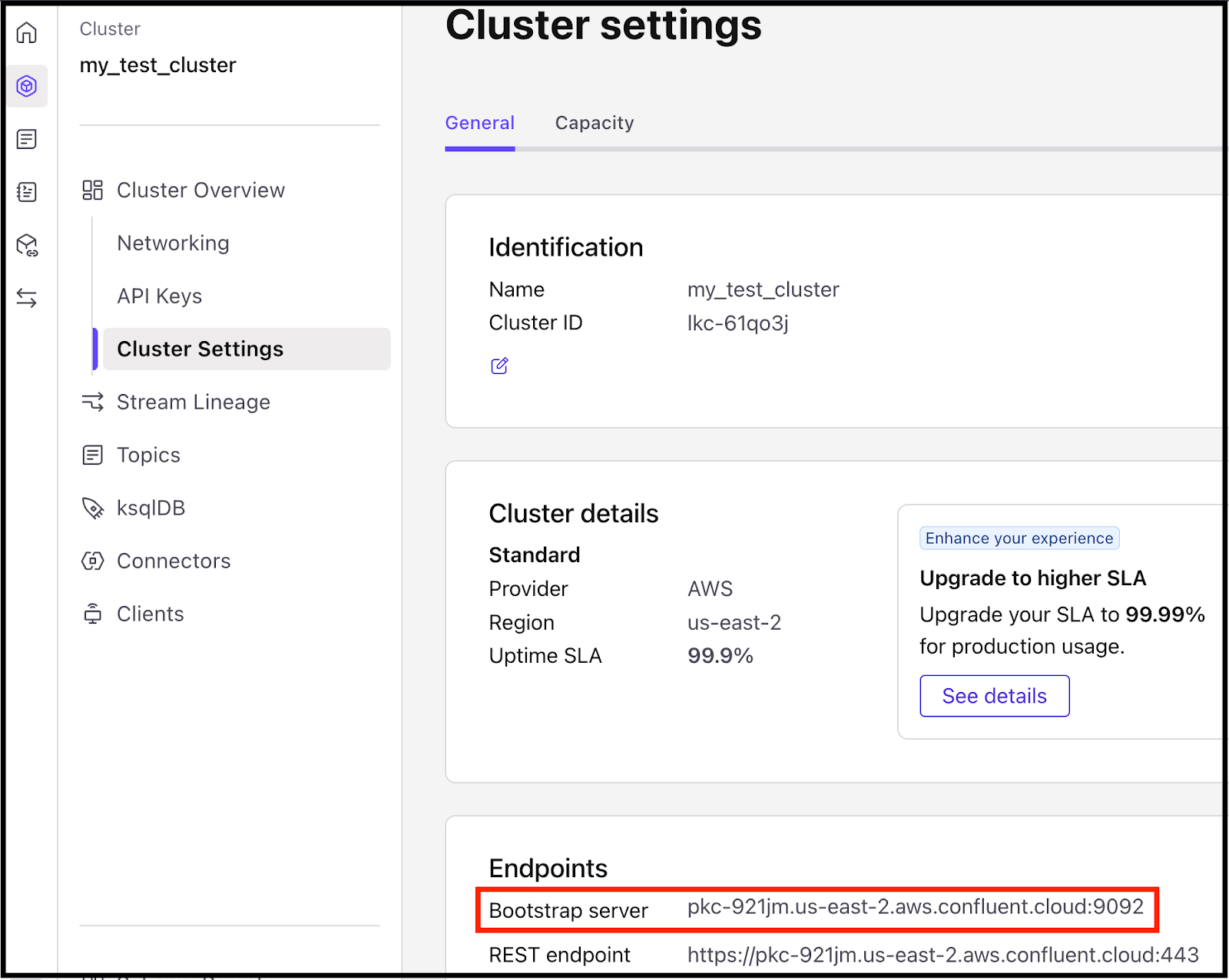
- Once the cluster is ready, go to Cluster Settings.
- Under Endpoints, locate your Boostrap Server URL.
- Copy this URL. It will be used by your Kafka clients to connect.
Troubleshooting Common Issues With Bootstrap Server Connections
There are some common Kafka bootstrap server connection issues that you’re likely to run into as you learn how to build applications with Kafka. Let’s review their causes and how you can troubleshoot them:
Incorrect Bootstrap Server Configuration
Kafka clients fail to connect due to an incorrect hostname, IP address, or port number specified in the bootstrap.servers configuration file. It can happen due to the following reason:
-
The hostname or IP address in bootstrap.servers is incorrect or unreachable.
-
You provided a wrong port number (e.g., using 9092 for a secured cluster instead of 9093).
-
You are using an internal/private network address that isn’t accessible to clients.
You can troubleshoot these issues by executing the following steps:
-
Verify the correct hostname and port from your Kafka cluster settings.
-
Use the correct security protocol (SASL_SSL, PLAINTEXT, etc.).
-
Test connectivity with telnet or nc network tools to check if the broker is reachable.
Broker Availability or Network Issues
Kafka clients can't connect because brokers are down, unreachable, or behind a firewall. It can happen if:
-
Kafka brokers aren't running or are misconfigured
-
The brokers are behind a firewall or on a private network, preventing external access
-
Clients and brokers are in different network zones, and routing isn't set up correctly
You can troubleshoot these issues by:
-
Ensuring Kafka brokers are running and healthy by checking the logs
-
If the broker is behind a firewall, allowing Kafka traffic on the correct ports (e.g., 9092 for plaintext, 9093 for SSL)
-
Using the correct advertised listener (internal vs. external) if the broker is on a private network
Misconfigured Kafka Listeners
The broker is running, but clients fail to connect due to misconfigured Kafka listeners. It can happen if:
-
listeners and advertised.listeners are incorrectly set
-
The broker is binding to localhost (127.0.0.1), preventing external access
-
Ports are not properly mapped in a containerized setup (e.g., Docker)
You can troubleshoot these issues by:
-
Checking and correctly configuring the listeners in the server.properties file
-
Ensuring the port mappings are correct for a containerized environment
Not Specifying Enough Bootstrap Servers
Kafka clients may fail to connect if the single bootstrap server specified is down. That can happen if:
-
Only one broker is listed in the bootstrap.servers configuration file, which could be unavailable at times
-
Clients can’t discover other brokers dynamically
You can resolve these issues by:
-
Specifying multiple brokers in bootstrap.servers file for high availability
-
If using Confluent Cloud, using the single provided endpoint (Confluent manages high availability for you)
Mismatched Kafka Client and Broker Versions
Clients experience compatibility errors when interacting with a Kafka cluster. This can happen when:
-
The Kafka client version is newer or older than the broker version
-
The client does not support the broker's features
You can resolve these issues by:
-
Ensuring the Kafka client matches the broker version.
-
If upgrading clients, checking the Kafka compatibility matrix.
-
Upgrading or downgrading your Kafka client library as needed.
Authentication Failures
Clients fail to authenticate when connecting to a secured Kafka cluster. It can happen if you have:
-
Incorrect API Key and Secret in the client configuration
-
Missing sasl.jaas.config or incorrect authentication mechanisms (PLAIN, SCRAM, GSSAPI)
You can resolve these issues by:
-
Ensuring the correct API Key & Secret are used
-
Verifying authentication settings match the broker’s configurations
Insufficient Broker Resources (Memory, Disk, Threads)
Kafka clients experience timeouts, lag, or dropped connections. It can happen due to the following reason:
-
The broker is overloaded due to insufficient memory, CPU, or disk space.
-
Thread exhaustion due to too many concurrent connections.
You can troubleshoot these issues by executing the following steps:
-
Monitor broker resource usage.
-
Increase Kafka heap size in server.properties file:
Monitoring and Logging Kafka Bootstrap Server
The Kafka bootstrap server is a critical component that allows clients to connect to the cluster. Proper monitoring and logging ensure that the cluster remains healthy and issues are detected early.
Some of the key metrics to monitor are as follows:
-
Broker health (CPU, memory, disk usage)
-
Network activity (connection counts, request latency)
-
Message throughput (producer/consumer lag, log flush rates)
-
Replication status (ISR – In-Sync Replicas, under-replicated partitions)
Monitoring and logging tools of Kafka bootstrap server are described below:
|
Tool |
Purpose |
Open Source Kafka |
Confluent Cloud |
|
JMX (Java Management Extensions) |
Exposes Kafka metrics |
Yes |
Yes |
|
Prometheus and Grafana |
Collects and visualizes Kafka metrics |
Yes |
Yes |
|
Kafka Metrics Reporter |
Exposes internal Kafka metrics |
Yes |
Yes |
|
ELK Stack (Elasticsearch, Logstash, Kibana) |
Centralized logging for Kafka events |
Yes |
Yes |
|
Confluent Control Center |
UI-based Kafka monitoring and alerting |
No |
Yes |
|
Confluent Cloud Monitoring |
Managed real-time monitoring for Kafka clusters |
No |
Yes |
|
Confluent Cloud Stream lineage |
End-to-End Data Flow Monitoring |
No |
Yes |
Confluent Cloud provides pre-built dashboards and alerts to reduce troubleshooting time.
Best Practices for Bootstrap Server Setup & Monitoring
The Kafka bootstrap server is the entry point for clients to connect to a Kafka cluster. Proper setup ensures high availability, security, and performance.
Some of the best practices that you can apply are as follows:
-
Avoid a single point of failure by setting up multiple Kafka brokers in the cluster.
-
Distribute client connections across multiple bootstrap servers for better reliability by using a client facing load balancer.
-
Distribute brokers across different racks/data centers to handle failures efficiently.
-
Enable encryption by using SSL/TLS to encrypt data in transit. Similarly use SASL (Simple Authentication and Security Layer) for authentication.
-
Enable JMX for metrics monitoring. You can use Prometheus and Grafana or Confluent Control Center for real-time monitoring.
Real-World Examples: What Happens When Bootstrap Server Connections Fail?
Failure to properly configure Kafka bootstrap servers can cause serious technical issues that lead to business disruptions. Here are some examples of the downstream consequences:
-
Due to a failure in the producer and consumer applications connecting to the Kafka cluster, an e-commerce site is unable to update stock levels in real time, resulting in customers purchasing items that are no longer available.
-
A banking app displays incorrect balances due to delayed or incomplete transaction event streams, caused by Kafka clients being unable to retrieve topic metadata due to misconfigured ACLs, broker failures, or leader election issues.
-
A ride-hailing app fails to display available drivers due to delays in the real-time location update Kafka topic, which may result from overloaded or misconfigured brokers, causing under-replicated partitions or leader election failures.
-
A healthcare provider unintentionally exposes patient records due to weak ACLs, resulting in a HIPAA violation. This may occur if weak security settings allow unauthorized access to Kafka or if overly restrictive ACLs disrupt legitimate client connections.
-
During periods of high market volatility, a stock trading platform faces order execution delays due to unbalanced brokers. This may be caused by inefficient partition distribution, leading to some brokers being overloaded while others remain underutilized.
Security Considerations for Your Bootstrap Server Setup Process
By implementing proper security controls, organizations can protect data, ensure reliability, and maintain compliance. Ensuring that only authorized clients can interact with Kafka brokers is critical to prevent:
-
Unauthorized Data Access: Prevent attackers from reading or modifying sensitive messages.
-
Data Corruption and Loss: Unauthorized writes can compromise data integrity.
-
Service Disruptions: Malicious or misconfigured clients can overwhelm the cluster, causing downtime.
-
Compliance Violations: Data breaches can lead to fines (e.g., GDPR, HIPAA, PCI-DSS).
Make sure you follow these security best practices for your Kafka brokers:
-
Protect data in transit from eavesdropping and tampering by using TLS encryption between clients and brokers. Also, use CA-signed certificates instead of self-signed for added trust.
-
Ensure that only trusted users and applications can connect to the Kafka cluster. Use SASL/SCRAM with TLS for secure authentication. Avoid SASL/PLAIN without TLS, as credentials are sent in plaintext.
-
Manage access to topics by using Access Control Lists (ACLs) for authorization. Limit topic access to only essential users and applications, ensuring they receive only the minimum permissions needed.
-
Prevent unauthorized clients from discovering and connecting to the cluster by implementing private DNS or internal load balancers to hide broker details from public networks.
-
ZooKeeper manages Kafka’s metadata and should be protected. Enable SASL authentication for ZooKeeper nodes.
-
Monitor and audit Kafka security logs to detect unauthorized access attempts and potential breaches.
Next Steps for Learning Kafka Best Practices
Understanding the Kafka bootstrap server is essential for developers looking to build scalable and reliable real-time applications. It serves as the gateway for clients to connect to Kafka clusters, discover brokers, and ensure seamless data flow. By properly configuring bootstrap servers, monitoring their performance, and following best practices, you can enhance fault tolerance, security, and overall efficiency in their Kafka-based systems.
To continue mastering Kafka fundamentals, explore resources like O’Reilly’s Kafka: The Definitive Guide, as well as hands-on webinars and Confluent Developer courses. And you can get started with Confluent Cloud today to streamline Kafka operations and optimize your data streaming architecture.