Apache Kafka®️ 비용 절감 방법 및 최적의 비용 설계 안내 웨비나 | 자세히 알아보려면 지금 등록하세요
Apache Kafka® Auto Offset Reset – Configuration & Best Practices
The auto.offset.reset configuration in Apache Kafka® is a setting for consumers that determines where they should start reading messages when no previously committed offset is found.
When a Kafka consumer subscribes to a topic, it typically resumes from the last committed offset. However, if no committed offset exists (e.g., a new consumer group or expired offsets), auto.offset.reset defines the starting point:
- earliest: The consumer starts reading from the beginning of the topic.
-
latest: The consumer starts reading only new messages from the time it joins. -
none: The consumer throws an error if no previous offset is found.
In the rest of this page, you'll learn:
-
How auto.offset.reset interacts with consumer group behavior. -
When to use “earliest,“ “latest,” or “none“ for different use cases.
-
Best practices for managing offsets and ensuring reliable message consumption in Kafka.
How Apache Kafka® Handles Consumer Offsets
For developers working with Kafka, understanding auto.offset.reset is crucial because it affects how consumers start reading messages, especially in cases where no committed offset exists. Misconfiguring this setting can lead to:
-
Unexpected data loss if messages are skipped.
-
Duplicate processing if messages are reprocessed from the beginning.
-
Errors when a consumer group cannot determine where to start.
With a clear understanding of how auto.offset.reset works, developers can troubleshoot offset issues, such as diagnose why a consumer is starting at an unexpected position in a topic and ensure a new consumer group correctly starts reading from the desired point in a partition
Kafka consumers use offsets to track their position within a partition. An offset is a unique identifier for each message in a partition, ensuring that:
-
Messages are processed in order within a partition.
-
Consumers avoid reprocessing the same message unless configured to do so.
-
Consumer groups can resume processing from where they left off.
Each Kafka consumer group maintains its own offsets, which Kafka stores in a special topic called “__consumer_offsets”. When a consumer commits an offset, it marks the last successfully processed message, allowing it to resume from the correct position after a restart.
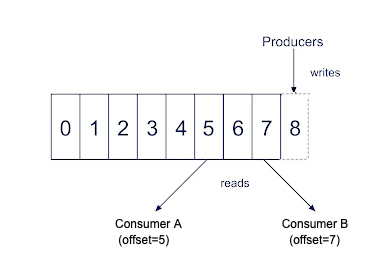
To better understand how Kafka consumers process messages, learn these essential concepts:
-
Kafka consumer: How consumers read messages from Kafka topics.
-
Kafka partition: How Kafka divides topics for parallel processing.
To learn more about these concepts you can refer to this blog post: “How Producers Work: Kafka Producer and Consumer Internals.”
By mastering auto.offset.reset and offset management, you'll gain deeper control over Kafka consumer behavior and ensure reliable message processing.
Choosing the Right Auto Offset Reset Strategy
In this section, you'll learn how to choose the best auto.offset.reset strategy for your Kafka consumers based on different streaming use cases. Selecting the right option ensures that consumers start processing messages from the correct position, preventing data loss or duplication.
The Role of the Auto Offset Reset Configuration
The auto.offset.reset configuration in Kafka determines how a consumer behaves when no initial offset is found for a partition. This happens when a consumer group begins reading from a topic for the first time or when the last committed offset is missing or inaccessible. Possible reasons include:
-
If a consumer group has never subscribed to the topic before, it won’t have a stored offset.
-
Kafka automatically deletes older messages based on retention settings, causing offsets beyond the retention period to become invalid.
-
If offsets are not committed regularly, they may expire and be removed from Kafka’s “__consumer_offsets“ topic.
-
In some cases, offsets may be deleted manually or lost due to misconfiguration.
-
If offsets are stored externally (e.g., in a database) and become corrupted or lost, the consumer must rely on auto.offset.reset to determine where to start.
Understanding how auto.offset.reset works ensures that your consumers behave predictably when starting up, preventing unwanted gaps or duplication in data processing.
Auto Offset Reset Configuration Options
Here are the available auto offset reset configuration options you can choose from:
earliest: Consumers read from the earliest available message in the topic. Best for processing all available data, especially for:
-
New consumer groups.
-
Use cases that require replaying historical data.
latest: Consumers start reading only new messages from the moment they subscribe. Ideal when processing only new data without needing historical messages.
none: The consumer throws an exception if no valid offset is found.Useful when strict offset control is required and processing should fail rather than starting at an unexpected position.
Some of the best practices for choosing the right auto offset reset strategy is as follows:
-
Idempotent processing: Since earliest reprocesses all available data, ensure your application handles duplicate messages correctly. Use message keys or deduplication logic to avoid reprocessing errors.
-
Monitoring and alerts: Set up alerts for unexpected offset resets to detect anomalies. Enable consumer lag monitoring to track whether consumers are falling behind.
-
Testing consumer behavior with different settings: Deploy consumers with different auto.offset.reset values in a test environment. Observe how they behave when offsets are missing or expired.
By understanding these options and leveraging Confluent Cloud’s UI for monitoring, you can ensure smooth and predictable Kafka consumer behavior.
Example Scenarios for Auto Offset Reset Settings
Understanding when to use each auto.offset.reset setting can help align your Kafka consumer behavior with your broader data retention, data consistency, and processing requirements. Below are real-world scenarios, best-fit use cases, and code snippets for each configuration.
earliest – For full historical processing or replay
Scenario:
You're building a data analytics pipeline that needs to process all available events, even if the consumer group is new or restarted. This is common in data lakes, reporting systems, or machine learning pipelines that require full data history.
Best fit for:
-
New consumer groups
-
Reprocessing all historical data
-
Audit or compliance logging
-
ETL jobs that run periodically
latest – For real-time, forward-only processing
Scenario:
You’re building a real-time monitoring dashboard or alerting system that only cares about new incoming data. Historical data isn’t relevant, and you want the consumer to start reading from the latest available message.
Best fit for:
-
Real-time dashboards
-
Alerting systems
-
Event-driven microservices
-
Use cases where old data is irrelevant
none – For strict offset control
Scenario:
You have a mission-critical system where data must be consumed from a precise point, and it's unacceptable to guess where to start. If no offset is available, the system should fail, alert, and require manual intervention.
Best Fit For:
-
Systems with strict compliance or regulatory constraints
-
Data pipelines with external offset management
-
Use cases where starting from an incorrect point is worse than failing
Troubleshooting and Common Issues
The auto.offset.reset setting in Kafka determines how consumers behave when there are no initial offsets or when current offsets no longer exist. This configuration is crucial for maintaining data integrity but can lead to significant issues if misconfigured. This section explores common issues, their root causes, and practical solutions.
Data Duplication When Using the "earliest" Setting
When set to “earliest” consumers start reading from the beginning of a topic if no offsets are found. While this ensures no messages are missed, it commonly causes data duplication. This occurs when consumer groups restart after offset expiration or when new consumer groups are created. The result can be reprocessing large volumes of historical data, leading to system overload and potential downstream impacts.
The subsequent statements outline various solutions:
-
Use idempotent processing: Design your message processors to handle duplicate messages gracefully.
// Example of idempotent processing with a deduplication cache
Set processedMessageIds = Collections.synchronizedSet(new HashSet<>());
consumer.poll(Duration.ofMillis(100)).forEach(record -> { String messageId = record.key(); if (!processedMessageIds.contains(messageId)) { processMessage(record); processedMessageIds.add(messageId); } });
-
Increase offset retention time: Modify broker settings to retain offsets longer.
# In server.properties
offsets.retention.minutes=10080 #10080 minutes (7 days)
-
Manually manage offsets: For more control, commit offsets explicitly rather than relying on automatic commits.
// Manual offset management
consumer.poll(Duration.ofMillis(100)).forEach(record -> {
    processMessage(record);
    Map<TopicPartition, OffsetAndMetadata> offsets = Collections.singletonMap(
        new TopicPartition(record.topic(), record.partition()),
        new OffsetAndMetadata(record.offset() + 1)
    );
    consumer.commitSync(offsets);
});
Data Loss When Using the "latest" Setting
When set auto.offset.reset to "latest" (the default) consumers start with only new messages. This approach risks data loss when offsets are reset, as messages produced during consumer downtime will be permanently skipped. This is particularly problematic in systems requiring complete data processing, such as financial applications or event-sourcing architectures.
The subsequent statements outline various solutions.
-
Switch to "earliest" for critical applications and extend log retention period.
-
Implement consumer lag monitoring in your code.
Log Retention Settings Affecting Offset Reset Strategy
Log retention settings directly impact offset reset behavior. If your retention period is too short (e.g., 24 hours) and a consumer falls behind beyond this window, even with "earliest" configured, the consumer will miss messages that have been purged. Organizations have experienced significant data loss when consumer lag exceeded their retention policy, causing offsets to reset to the latest available messages.
For critical applications prioritizing data integrity, use "earliest" combined with idempotent processing to handle duplicates. Extend log retention periods to accommodate potential downtime and implement consumer lag monitoring to detect issues before they cause data loss. For real-time applications where only current data matters, "latest" is appropriate.
Offset Reset Use Cases and Best Practices
Let's explore various practical applications and associated best practices in managing Kafka offsets.
-
Real-Time Analytics Dashboard: Need to display only the latest metrics without processing historical data.
Recommended Configuration:
props.put("auto.offset.reset", "latest");
props.put("enable.auto.commit", "true");
props.put("auto.commit.interval.ms", "1000");
Best Practice: Monitor consumer health and implement proper error handling to prevent missing critical updates.
-
Financial Transaction Processing: Cannot afford to lose any transactions, even during system maintenance
Recommended Configuration:
props.put("auto.offset.reset", "earliest"); props.put("enable.auto.commit", "false"); // Manual commit//Additional Settings
log.retention.hours=168 # 7 days retention offsets.retention.minutes=10080 # 7 days offset retention
Best Practice: Implement idempotent processing to handle potential duplicates, monitor consumer lag closely, and use manual offset commits after successful processing.
-
Event Sourcing Application: Need to rebuild state from historical events but may have huge backlogs
Recommended Configuration:
// During normal operation props.put("auto.offset.reset", "earliest");// During state rebuilding props.put("max.poll.records", "500"); // Limit batch size
Best Practice: Implement checkpointing to track rebuild progress and optimize resource usage during replay of large event histories.
-
IoT Data Collection: Intermittent connectivity may cause producers to buffer data locally
Recommended Configuration:
// For real-time monitoring props.put("auto.offset.reset", "latest");// For data analysis consumers props.put("auto.offset.reset", "earliest");
Best Practice: Use separate consumer groups with different reset policies for different processing needs.
Regular offset management using Kafka's command-line tools can help prevent issues. Commands to check consumer lag, reset offsets by time, or shift by specific message counts are essential troubleshooting techniques. Always align your offset strategy and retention settings with your specific business requirements to minimize risk.
Next Steps for Mastering Kafka Configurations
In this guide, you've learned that the auto.offset.reset configuration significantly impacts your Kafka applications' data integrity and processing behavior. The choice between "earliest" and "latest" represents a fundamental trade-off between potentially processing duplicates versus potentially losing data.
When determining your strategy going forward, consider these key principles:
-
Match your setting to your business requirements. Use "earliest" for systems where data completeness is critical (financial, analytics) and "latest" for real-time applications where only current data matters.
-
Align retention policies with consumer behavior. Ensure your log retention period accommodates expected consumer downtime and processing delays.
-
Implement proper monitoring. Regularly track consumer lag to detect issues before they trigger offset resets.
-
Plan for failure scenarios. Test how your system behaves when consumers restart or when offsets expire.
As you deepen your Kafka expertise, consider exploring:
-
Manual offset management: Taking full control of commits for precise processing guarantees
-
Kafka Streams state stores: Managing offsets alongside application state
-
Exactly-once semantics: Using transactions for stronger processing guarantees
Offset externalization: Storing offsets in external databases for custom recovery logic
You can learn more in our Confluent Developer courses, through our resource library, or by getting hands-on with serverless, cloud-native Kafka on Confluent Cloud. Another great place to dive deeper? O’Rielly’s Kafka: The Definitive Guide.